Md-101 — The Periodic Table in Sound
A 16-voice polyphonic virtual instrument where each of the 118 chemical elements acts as an acoustic preset, deterministically calculated from atomic and physical properties.
🖼️ Graphical Interface & Controls
Built with a Dark Studio aesthetic, luminescent neon accents, and high-contrast typography.
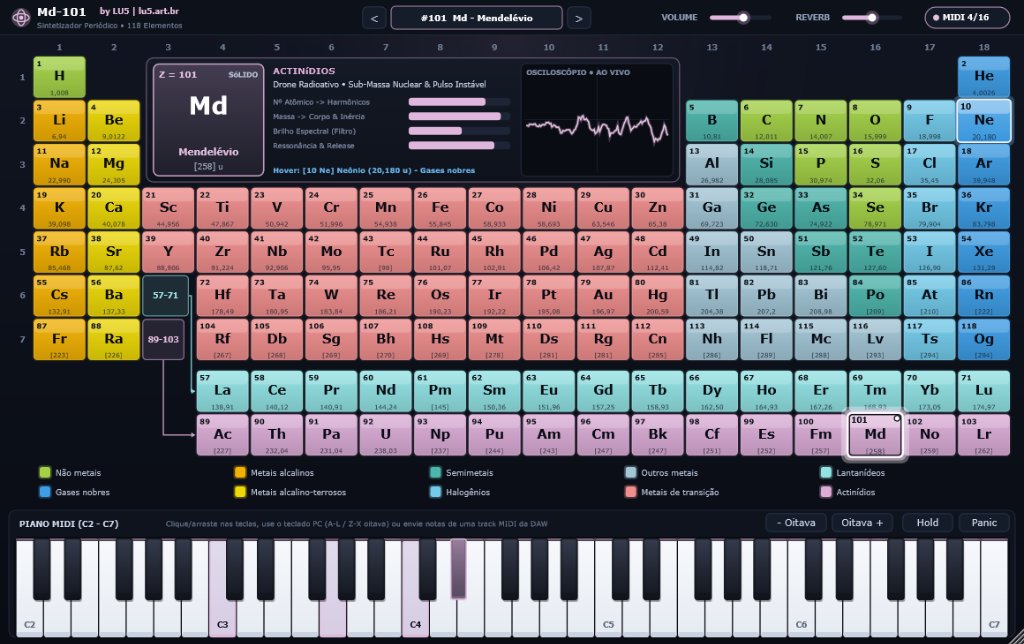
118-Preset Periodic Table
The upper half features the full periodic table with authentic chemical family color coding:
- One-Click Preset Loading: Click any cell to load its synthesized sonic preset immediately.
- Hover & Preview: Hovering over any element previews its properties in the center HUD.
- Active Frame & LED: Selected element is framed with a glowing border, active dot, and audio-reactive aura.
- Interactive Legend: Hovering over any of the 10 categories at the top highlights all corresponding elements.
Center HUD & Real-Time Scope
The central display provides physical atomic telemetry and live waveform analysis:
- Atomic Card: Displays Atomic Number (Z), Symbol, localized name, Atomic Mass, and STP phase.
- Telemetry Meters: Shows Harmonic Richness, Spectral Brightness, Body & Inertia, and Resonance & Release.
- Live Stereo Oscilloscope: Renders the precise waveform generated by active polyphonic voices.
- Sequential Navigation: Quick
<and>buttons to browse presets sequentially.
Top Bar & Language Selector
Global controls and studio utilities with a clean layout and de-zippered anti-click smoothing:
- Language Switcher (
EN | PT): Instant toggle between English and Portuguese, saved with your DAW session. - Master Volume: Smooth linear output gain control preventing digital clicks and overs.
- Ambience / Reverb: Regulates spatial reverb depth and stereo chorus spreading.
- Full DAW Automation: Both master volume and reverb sliders can be automated in your project tracks.
🎹 Virtual MIDI Keyboard & Performance Controls
Engineered for maximum playability, dynamic nuance, and live studio expression.
Vertical Velocity Sensitivity
The 61-key virtual keyboard detects the exact vertical position of your mouse click:
- Bottom tip of key: Maximum velocity (127 - Forte / punchy attack transient).
- Top area of key: Soft, intimate velocity (Piano / delicate touch).
- Continuous Glissando: Click and drag across the keys horizontally for smooth sweeps.
Computer QWERTY Keyboard Playback
Play melodies directly using your PC or laptop keyboard without requiring an external MIDI controller:
- White Keys:
ASDFGHJKL; - Black Keys:
WETYUOP - Octave Transpose:
Z(down 1 octave) andX(up 1 octave).
Performance Controls & Polyphony
Dedicated utility buttons designed for studio and live workflow:
- Voice & Polyphony Monitor (
MIDI 0/16): Real-time active voice count (up to 16) and status LED colored by the active chemical family.- Instant diagnostic ("Where is the sound?"): if you play and it stays at
0/16, MIDI is not reaching the plugin; if it rises to≥ 1/16and lights up, MIDI is fine and you only need to check Master Volume or audio output. - Hanging notes: reveals if notes are still active when your DAW playback is stopped (clear with the Panic button right next to it).
- Polyphony ceiling: reaching
16/16shows the 16-voice maximum is reached and older voices are being smoothly recycled (*voice stealing*).
- Instant diagnostic ("Where is the sound?"): if you play and it stays at
- Hold Button (Virtual Sustain): Latches triggered notes to sustain indefinitely for infinite pads and drones.
- Panic Button: Dispatches an instant All Notes Off command and silences any hung voices.
- - Octave and Octave +: Shifts the keyboard register across ±2 octaves (spanning C0 to C9).
- DAW MIDI Feedback: Virtual keys light up in real time when notes are received from a DAW MIDI track.
🎛️ Installation Guide & DAW Setup
Compatible with all major professional digital audio workstations on Windows and Linux.
Windows Installation
Copy the built Md-101.vst3 bundle into your standard VST3 plugins folder:
C:\Program Files\Common Files\VST3\Md-101.vst3
Or launch the Standalone desktop executable directly:
build\Md101_artefacts\Release\Standalone\Md-101.exe
Linux Installation
Copy the compiled Md-101.vst3 directory into your user's personal VST3 folder:
mkdir -p ~/.vst3
cp -r build/Md101_artefacts/Release/VST3/Md-101.vst3 ~/.vst3/
Then rescan VST3 plugins within your DAW of choice.
Recommended DAW Configurations
Step-by-step setup notes for each host environment:
| DAW / Host | Track Type | Recommended Configuration |
|---|---|---|
| Cockos Reaper Recommended | Virtual Instrument on New Track | Insert via "Insert > Virtual instrument on new track". Reaper automatically maps 16 polyphonic voices, assigns MIDI Channel 1, and populates the 118 presets in its native program selector. |
| Tracktion Waveform Recommended | MIDI / Plugin Track (VST3) | Add Md-101 directly into the MIDI track's plugin rack. Full envelope automation support for element, masterGain, and space with native stereo routing. |
| Ableton Live | MIDI Track | Drag Md-101 onto a MIDI track; trigger via MIDI clips or hardware controllers. The element parameter is fully automatable via Clip Envelopes. |
| FL Studio | Channel Rack (Plugin Instrument) | Add via Plugin Manager; use the Piano Roll to compose expressive melodies with per-note vertical velocity. |
| Steinberg Cubase / Nuendo | Instrument Track (VST3) | Native recognition of 118 presets in the track inspector's VST3 program drop-down, with zero latency and 64-bit stereo audio processing. |
| PreSonus Studio One | Instrument Track | Drag from the Instruments browser tab; seamless reverb tail handling and continuous parameter automation. |
| Bitwig Studio | Instrument Track | Full modular integration; map custom LFO modulators and envelopes to volume, space, or element selection. |
🧪 The 10 Chemical Families & Sound Architecture
How each group of the Periodic Table dictates timbre, filter slope, and acoustic response:
| Chemical Family | Official Color | Synthesis Architecture | Musical Role & Example Presets |
|---|---|---|---|
| Noble gases | ● #3D9EE5 | Atmospheric pads + filtered gaseous breath + vast spatial reverb | Ethereal harmonic beds, cinematic soundscapes, ambient music (e.g., #2 He Helium, #10 Ne Neon, #118 Og Oganesson). |
| Nonmetals | ● #A3D246 | Organic analog poly/wind; diatomic gases add breath turbulence | Warm melodic leads, expressive chords, gentle keys (e.g., #1 H Hydrogen, #6 C Carbon, #8 O Oxygen). |
| Halogens | ● #72CBEB | Asymmetric narrow pulse + high-resonance TPT filter | Reactive acid leads, aggressive arpeggios, cutting synth basses (e.g., #9 F Fluorine, #17 Cl Chlorine, #53 I Iodine). |
| Alkali metals | ● #F3B202 | Electric percussive plucks + fast attack pitch spark transient | Fast arpeggios, tonal percussion, modern punchy plucks (e.g., #3 Li Lithium, #11 Na Sodium, #19 K Potassium). |
| Alkaline earth metals | ● #EDD805 | Full-bodied brass-poly + sub-harmonic oscillator (-1 octave) | Synthetic symphonic brass, vigorous synth chords, dense foundations (e.g., #4 Be Beryllium, #12 Mg Magnesium, #20 Ca Calcium). |
| Transition metals | ● #EF8E8D | 2-operator FM bells and resonators modulated by column position | Harmonic bells, chimes, metallic marimbas, inharmonic gongs (e.g., #26 Fe Iron, #29 Cu Copper, #79 Au Gold). |
| Semimetals | ● #4DB6AC | Non-linear sinusoidal wavefolding + glassy overtones | Bright digital pianos, futuristic semiconductor textures (e.g., #5 B Boron, #14 Si Silicon, #32 Ge Germanium). |
| Other metals | ● #A3C7D7 | Warm electric tines + ductile tube saturation | Vintage electric pianos (Rhodes / Wurlitzer style), neo-soul chords (e.g., #13 Al Aluminium, #50 Sn Tin, #82 Pb Lead). |
| Lanthanides | ● #92E3E4 | Detuned super-harmonics (+1 and +2 octaves) + ensemble detuning | Luminescent rare-earth ensemble textures, laser-like shimmer (e.g., #57 La Lanthanum, #60 Nd Neodymium). |
| Actinides | ● #DCADD7 | Heavy nuclear drones + stochastic Geiger scintillation | Massive sub-bass drones, industrial rumbles, dark sci-fi atmospheres (e.g., #92 U Uranium, #94 Pu Plutonium, #101 Md Mendelevium). |
❓ Frequently Asked Questions (FAQ)
How do I automate element changes in my DAW?
In your DAW's MIDI track automation lane, enable automation for the `element` parameter (values 1 to 118). You can schedule presets to switch between song sections smoothly and without glitches!
A note is stuck sounding or there is no sound. How do I fix it?
Check the `MIDI n/16` indicator at the top: if it reads 0/16, MIDI events are not reaching the plugin from your DAW or keyboard. If it reads 1/16 or higher but you hear no sound, simply increase the Master Volume. If a note continues ringing indefinitely, click the Panic button in the footer to issue an immediate All Notes Off command and make sure Hold is not toggled on.
Does the synth consume heavy CPU resources?
No. The Md-101 synthesis engine is implemented in high-performance C++17 with analytic PolyBLEP oscillators and zero-delay feedback TPT SVF filters. CPU footprint is exceptionally low, allowing dozens of instances per session.
How does the language toggle work?
Click the EN | PT button in the top header. All element names, chemical families, telemetry labels, and status messages switch instantly between English and Portuguese, and your selection is persisted with the project.